
Palworld beginner guide
How to Breed Pals in Palworld: Farm, Cake, Eggs, and Parent Steps
The reliable answer to how to breed Pals in Palworld is a repeatable seven-part loop: choose a target, prepare a reachable Breeding Farm, assign a compatible pair, add Cake, verify the work state, collect the Egg, and incubate it. The farm creates the Egg; it does not choose a useful parent route for you.
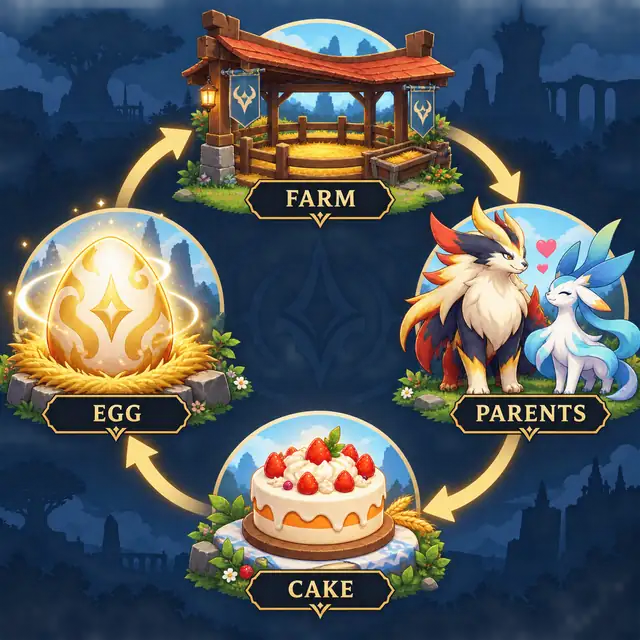
Quick answer: how do you breed Pals in Palworld?
First decide which Pal you want and whether the goal is a species, a work role, a combat build, or a passive-skill project. Check a current parent relationship, then make sure the pair is reachable from the Pals you own. Build or use the Breeding Farm in a clear base area, assign one compatible male and one compatible female, and place Cake in the farm's expected storage slot.
Once the pair shows an active breeding task, leave the route and storage space clear. Collect the Egg, move it to an incubator, and record the parents and result before you repeat the process. If the pair does not work, check Cake, assignments, pathing, and storage before replacing the parents.
- Target: Pick the Pal or role you want before you spend Cake.
- Parents: Use a verified pair or trace a route from the Pals in your collection.
- Farm: Leave a visible walking lane and confirm both parents stay assigned.
- Cake: Stock the farm before waiting; an assigned pair without Cake cannot complete the loop.
- Egg: Collect and incubate the Egg, then keep useful parents and intermediates organized.
What you need before breeding
The exact unlock level, material count, and server behavior can change with Palworld updates and world settings. Check the technology tree and build menu in your own save instead of trusting a permanent number from an older guide. The practical requirement is a working farm loop: a pen, two compatible parents, Cake, room to walk, and somewhere to store Eggs and intermediate Pals.
A short preparation check prevents most false breeding problems. Keep the target and parent names in a note, reserve a box for the breeding line, and decide whether you are making one Egg or a batch. If you are aiming for passives, keep clean trait carriers separate from ordinary work assignments.
| Requirement | Check before starting | Why it matters |
|---|---|---|
| Target Pal | Write the species, role, or passive goal in a note. | A clear goal stops you from changing parents halfway through a batch. |
| Breeding Farm | Confirm it is unlocked and place it on a flat, reachable area. | A blocked or unreachable pen can look like an invalid pair. |
| Compatible parents | Check both names in a current chart or calculator. | The farm cannot repair a wrong species relationship. |
| Cake | Make or reserve enough Cake for the planned Eggs. | The pair can be assigned while the resource loop is still stopped. |
| Storage | Leave a box or marked area for Eggs and intermediate Pals. | A full or mixed box makes a successful result hard to track. |
| Incubator | Prepare an available incubator and the setting you normally use. | Breeding produces an Egg; incubation is a separate time and temperature step. |
Use the current game menu for unlocks and numbers. This page explains the decision order and keeps uncertain patch-specific values out of the recipe.
How to breed Pals step by step
Run one complete test before building a large breeding block. A single test tells you whether the farm accepts the parents, whether Cake is in the right place, and whether your base path is reliable. It also gives you a clean record for a longer breeding chain.
When a direct pair is unavailable, do not guess from a broad list. Enter the Pals you own into the breeding calculator, choose the target, and set a generation limit that fits your storage and Cake supply. Treat each intermediate Pal as part of the plan until the final Egg is collected.
The process below is intentionally mechanical. Changing one variable at a time makes it easier to tell a data problem from a facility problem.
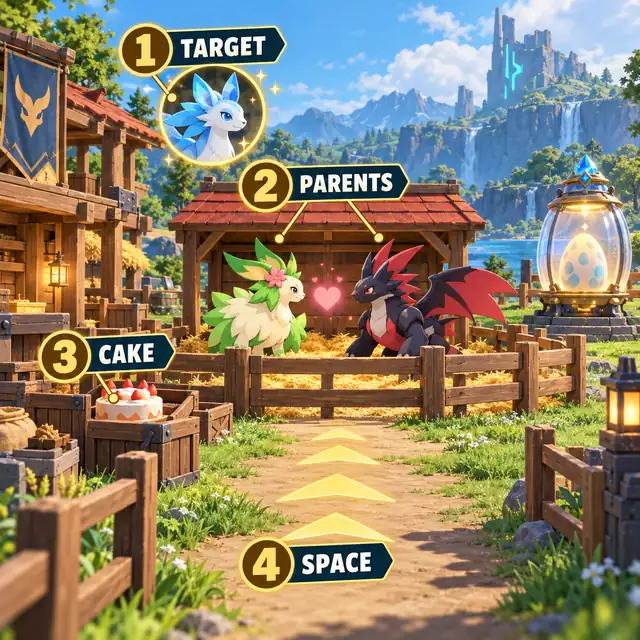
-
1. Choose a target and a reason
Decide whether you want a species for the Paldeck, a base worker, a combat Pal, a mount, or a passive-skill project. The best pair depends on that reason and on the parents already in your box.
-
2. Verify the parent relationship
Check a current chart or use the calculator. A direct pair is useful only if both parents are available; otherwise trace the shortest practical route from your owned Pals and keep the intermediate names visible.
-
3. Prepare the farm area
Use a flat area with a clear lane to the pen. Move walls, storage, decorations, and other work objects that can trap a Pal. Keep the Cake input and Egg collection area easy to inspect.
-
4. Assign the pair
Place one compatible male and one compatible female in the farm. Watch the work state for a moment. If one parent leaves, stands outside, or returns to a different task, fix that before adding more Cake.
-
5. Add Cake and confirm work
Put Cake in the farm storage expected by your current game version. An active pair and a stocked Cake slot should show a clear work state. If the state is unchanged, inspect the resource and path before changing the combination.
-
6. Collect the Egg and label the result
Move the completed Egg to a marked box or the incubator. Write down the parents, target, and any useful passive notes. This small record prevents a good intermediate Pal from being sold or reassigned.
-
7. Incubate and repeat carefully
Use an available incubator, apply the setting you normally play with, and treat incubation time separately from farm production. Repeat only after you know whether the last Egg advanced the species route or the passive plan.
Keep a breeding session easy to inspect
A good breeding base is less about squeezing in the most pens and more about making each state visible. Keep a walking lane from the base path to the farm, a predictable place for Cake, and a separate area for finished Eggs. Put rare parents and trait carriers away from automatic work assignments when possible.
If you add more farms, finish one complete loop first and copy the layout only after you can identify a stuck parent quickly. More pens increase Eggs, Cake use, storage pressure, and the number of work states you need to check. A simple layout is easier to maintain after a patch changes collisions or base behavior.
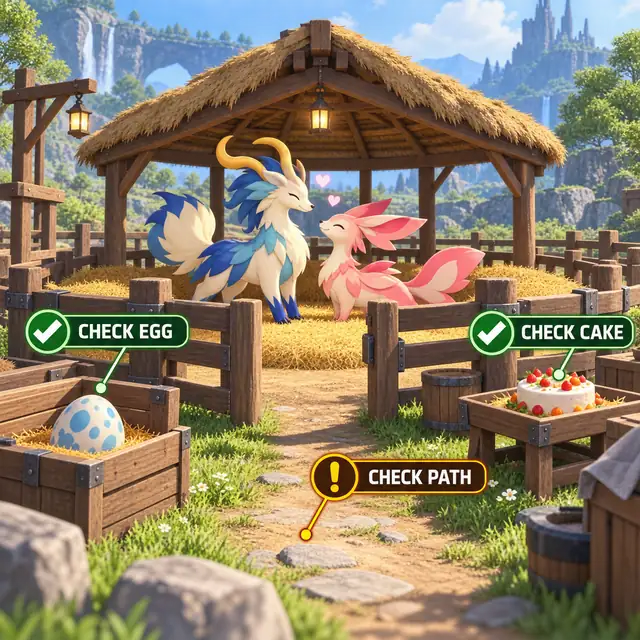
- Visible pen: Stand where you can see whether both parents are inside and working.
- Clear path: Leave room around doors, corners, slopes, and nearby storage.
- Cake zone: Restock from one known location and check the slot before waiting.
- Egg zone: Move finished Eggs away from parents and intermediate Pals.
- Trait zone: Keep passive carriers labeled so a work assignment does not hide them.
Why is the Palworld breeding attempt not working?
Troubleshoot from the facility outward. First inspect whether the parents stay assigned and whether Cake is available. Next check the walking lane, collection space, and incubator. Only after those checks should you question the parent relationship or the data snapshot. This order avoids rebuilding a route when the real problem is a blocked pen.
Status wording can differ by platform, language, patch, and server settings. Treat the visible state in your save as evidence, record the date, and recheck the current game UI when a guide and your world disagree.
- One parent leaves: Clear the route, reassign one Pal at a time, and watch it reach the pen before adding the second.
- No progress with two parents: Check that Cake is in the expected farm storage and that the work state is active rather than merely showing two nearby Pals.
- No Egg is visible: Move older Eggs, inspect the collection area, and confirm the farm has not filled a storage slot.
- The child is unexpected: Verify the exact parent names and current dataset. Do not assume a chart from another patch has identical relationships.
- The passive is missing: Species inheritance and passive inheritance are separate planning problems. Keep trying with clean carriers instead of treating one Egg as a guarantee.
- The route is too long: Add more owned Pals or raise the generation limit in the calculator, then compare Cake, Egg, and storage costs before committing.
When to use the calculator and specialist guides
Use this how-to page when you need the order of operations. Use the calculator when you know the target but not the parent route, the breeding chart when you want to inspect a specific pair, and the breeding tree when you want to compare branches from an owned pool. The combos guide is a shortlist of useful targets, not a guarantee that your save owns every parent.
The Cake and incubator guides cover resource production and hatch settings in more detail. The passive-skills guide explains why a correct species pair can still require several Eggs. Linking these decisions keeps the beginner loop honest: first make the species route work, then optimize traits and speed.
Open the breeding calculator Read the data method Plan passive skills Read the breeding farm guide Best Breeding Combos
FAQ: Palworld breeding steps
How do you breed Pals in Palworld for the first time?
Choose a target, unlock and place a reachable Breeding Farm, assign one compatible male and one compatible female, add Cake, confirm the active work state, collect the Egg, and incubate it. Check your current technology tree and game UI for version-specific unlocks.
How do I assign Pals to the breeding farm?
Place a compatible pair in the farm's assignment slots and watch whether both remain at the pen. If one returns to another task, clear the path and reassign one Pal at a time before troubleshooting the relationship.
Do you need Cake to breed Pals in Palworld?
The standard Breeding Farm loop requires Cake as its resource input. If a pair is present but no progress appears, check the expected storage slot and the current in-game instructions before replacing the parents.
How many Cake do you need for one breeding Egg?
Use the current farm and server behavior in your save as the source of truth. This site plans one Cake input per recorded breeding step by default, but settings and future updates can change how a session behaves.
Can breeding guarantee a passive skill?
No. A parent relationship can produce a species without guaranteeing a specific passive set. Keep clean trait carriers, plan several Eggs, and treat the passive guide's notes as planning estimates rather than promises.
Why can the calculator find a route but my farm does not produce an Egg?
The calculator answers a parent-route question; the farm runs the facility. Check assignment, Cake, pathing, storage, and the current game state separately from the route result.
What should I do if I cannot find a Palworld breeding combination?
Add more Pals from your collection, increase the generation limit gradually, and inspect the intermediate names. A route may be absent because the starting pool is too small, the target is self-bred, or the local dataset needs to be refreshed after a patch.
Is this an official Palworld breeding guide?
No. It is an independent fan guide and calculator. Official announcements, the game UI, and your current server settings take priority when they conflict with this page.
The dependable Palworld breeding loop
Breeding becomes predictable when you separate the decisions: target first, parent route second, farm and Cake third, then Egg collection and incubation. Start with one visible pen and one complete test. Keep the parents, intermediate Pals, and passive goals labeled so a successful result remains useful for the next generation.
When the facility works but the route is unclear, use the calculator and breeding tree to plan from the Pals you actually own. When the species route works but the traits do not, switch to the passive-skills guide and expect several Eggs. This workflow saves Cake and makes patch differences easier to spot.
Data and source note
This is an independent fan guide. Parent relationships used by the calculator come from a reduced snapshot derived from the public Palworld Paldex API. Building behavior, Cake requirements, passive inheritance, and server settings can change; use the in-game UI and current official information as the final authority. The three diagrams on this page are illustrative concept art generated for explanation, not official Palworld screenshots.